Company Website Security: The Basics You Need to Have in Place
The basic steps for keeping a company website secure: HTTPS, regular updates, strong passwords and 2FA, user access rights, backups and protection from spam.
Read the article →
A company website built years ago often feels dated: it doesn't display well on phones, it is slow to load or it is hard to update. A redesign is a natural step. But there is one risk that is often overlooked: the better new website actually loses visitors from Google because the addresses of the old pages suddenly disappear.
This article covers the signs that a website needs a redesign, and the steps that keep the move to a new website from undoing the rankings you have already built on Google.
Not every old website has to be replaced. Consider a redesign if several of these apply:
If the only problem is outdated content, fixing the content may be enough. But if the problem lies in the website's foundations, rebuilding is usually more effective than patching.
Google knows your website through the address (URL) of each page. A page at /products/cardboard-box that has long appeared in search results has a "history" with Google. If on the new website that address becomes /catalogue/carton-boxes without notice, Google and anyone clicking the search result will land on a "not found" page (a 404 error).
As a result, that page's ranking can drop, and links from other websites pointing to the old address are wasted too. The key lies in two things: keeping the same address, or redirecting the old address to the new one correctly. Those links are valuable, so see also backlinks for a company website.
Before designing anything, list every page on the old website. You can draw on the old website's sitemap, the page data in Google Search Console or a manual crawl. For each page, note:
The inventory is also a chance to tidy up your content: merge overlapping pages, update old information and remove what is no longer useful.
Where possible, keep the same page addresses on the new website. This is the safest approach. But a redesign is often a chance to tidy up the structure, so some addresses do need to change.
For addresses that change, use a 301 redirect, a permanent redirect from the old address to the new one. A 301 redirect tells browsers and Google that the page has moved permanently, so visitors are sent on automatically and Google understands that the new page replaces the old one.
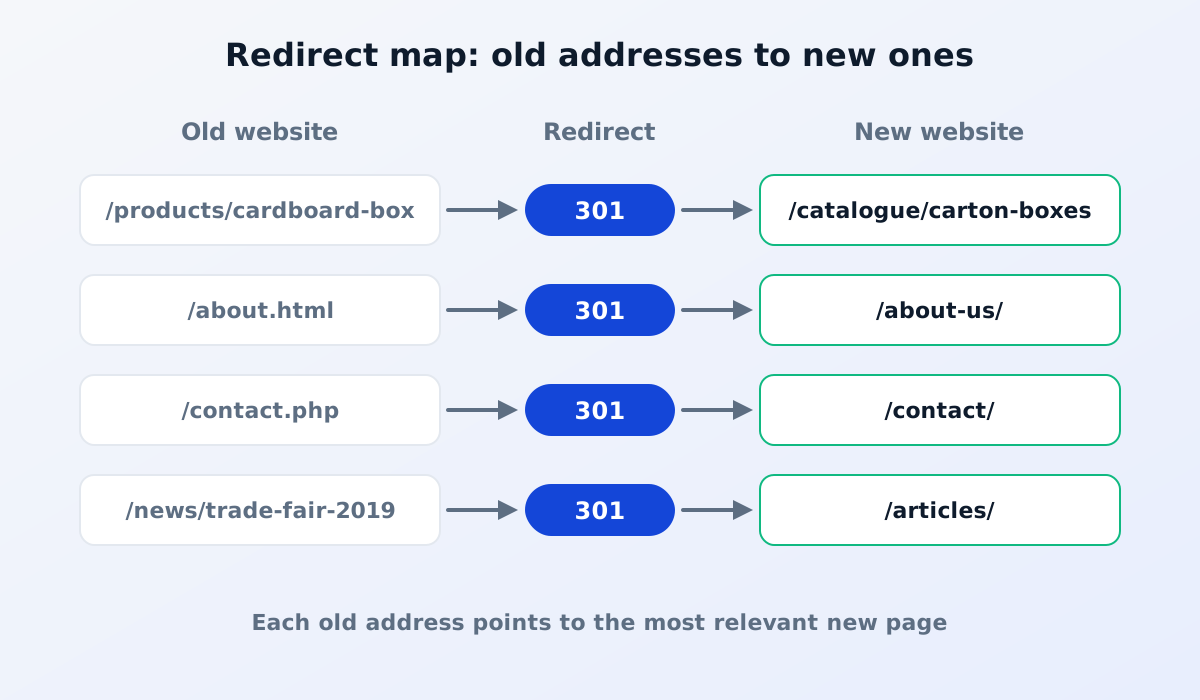
A few important principles:
Besides addresses, pay attention to the page titles, descriptions and body text of the pages that have been bringing in visitors. If a page already ranks for important keywords, don't delete it or drastically change its content without a good reason. The design can change, but the information visitors are looking for should stay.
Read also: how to get your company website on Google.
Once the new website is live, submit the new sitemap through Google Search Console. Over the following weeks, regularly check:
Small fluctuations after a move are common. What matters is fixing any problems promptly. If a page still isn't showing up, check why a page isn't showing on Google.
Not necessarily. If page addresses are kept or correctly redirected with 301 redirects, and important content stays, rankings can usually be maintained. Temporary fluctuations may occur while Google processes the changes.
No, and it is best not to without a good reason. Changing domain adds redirect work and risk. If you really must change it, every address on the old domain needs redirecting to the new domain. Read also choosing between a .co.id and a .com domain.
Ideally for the long term. Links from other websites, documents or customers' bookmarks may still point to old addresses years later.
A good redesign changes how your website looks, not the trail you have already built on Google.
Planning to refresh your company website? See our website services, or read how long it takes to build a company website.
The basic steps for keeping a company website secure: HTTPS, regular updates, strong passwords and 2FA, user access rights, backups and protection from spam.
Read the article →
Why your company should use email on its own domain, the service options, and a plain-English guide to SPF, DKIM and DMARC so your emails stay out of spam.
Read the article →