How Much Does a Company Website Cost? The Factors That Decide the Price
Quotes for a company website can vary widely. Learn what drives the price and the running costs that are often forgotten before you choose a quotation.
Read the article →
CMS stands for Content Management System. Put simply, a CMS is an admin area where you change what is on your website, such as text, photos, products and articles, without touching any code.
For a company, the CMS decides whether the website becomes a working tool that is always up to date, or a digital brochure that is left to go stale. This article explains how a CMS works, what it does for you and what to look for when choosing one.
With a CMS, your team signs in to the admin area with an email address and password. There they can:
Once the changes are saved, the website is updated. There is no need to contact a developer and wait for a slot in their schedule.
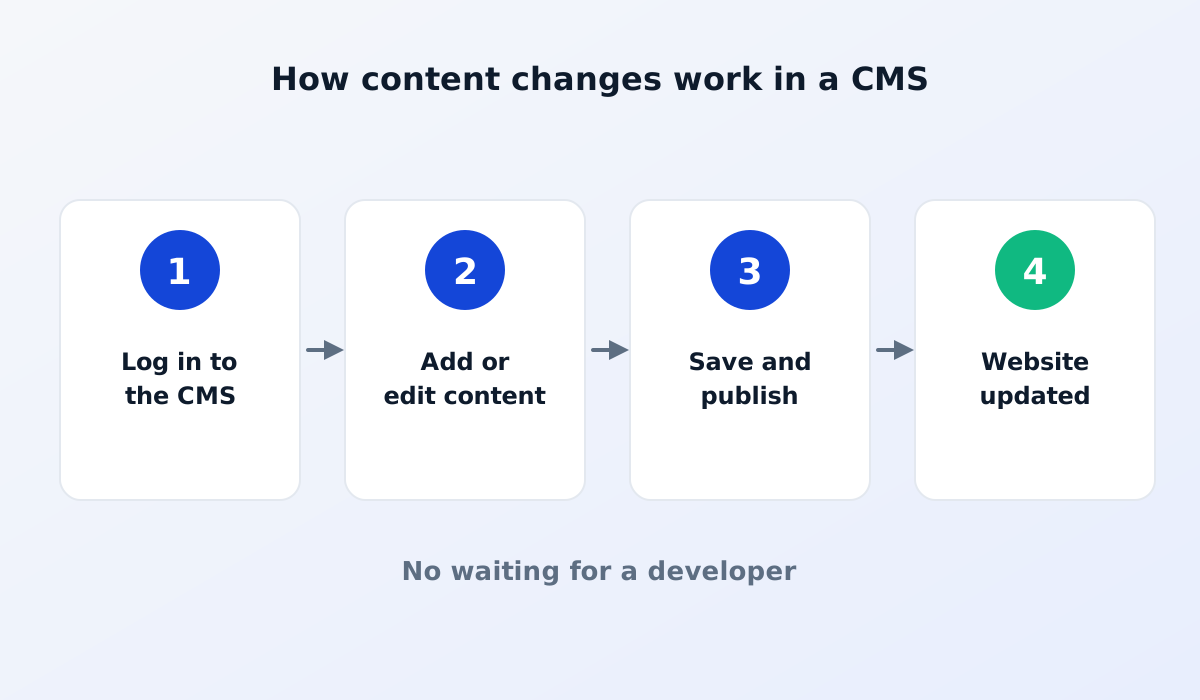
Say your company launches a new product. With a CMS, the process looks roughly like this:
Without a CMS, you would have to send all of that information to a developer, wait for them to do it, then check the result. For one product that may not feel like much, but across dozens of products a year the difference is huge.
New products, company information and recent projects change often. Without a CMS, websites tend to be left out of date because every change is a hassle. An out-of-date website makes prospective customers wonder whether your company is still active.
Without a CMS, every small change means a fee and a wait. With a CMS, your team does it themselves in minutes.
Google favours websites that are active and relevant. With a CMS, you can regularly add articles and product pages and set the title and description of each page. All of this helps your website get found in search.
A good CMS has user settings and access rights. For example, the marketing team may write articles, while only an administrator may change the website settings. That way work can be shared without worrying about accidental changes.
There are two common approaches. An off-the-shelf CMS offers lots of features for many kinds of website, but it often feels complicated for a team that only wants to update products and articles. It also needs regular updates to stay secure. If you use WordPress, follow this monthly security checklist.
A CMS tailored to your business is usually simpler: its menus and terms follow the way your company works, for example products, industries or materials. As a result, your team picks it up faster and updates content more often.
Which is better depends on your needs. What matters most is that your team actually uses it.
Your CMS accounts are the keys to your website. Use a strong, different password for each person, don't share one account across the whole team, and remove access for employees who have left your company. These simple steps prevent most security problems. Turn on two-step verification for admin accounts as well.
A CMS is designed for content: text, images, products and articles. Major changes to the design or new features are usually still handled by a developer, because they affect the structure of the website. This split actually works in your favour: your team is free to change content without the risk of breaking the layout, while bigger changes are still handled by experienced people.
No. If you are comfortable typing documents and uploading photos, you can use a CMS. A short training session is usually enough.
Generally, yes. Some CMSs take a moment to update the page, especially on websites optimised to be very fast. Ask your provider how long it takes.
A mistake in text or a photo can be fixed straight away by changing it back. For extra safety, make sure your provider makes regular backups.
A CMS turns your website from a static brochure into a working tool that your own team keeps up to date.
Comparing types of website? Read company profile website vs product catalogue website.
Quotes for a company website can vary widely. Learn what drives the price and the running costs that are often forgotten before you choose a quotation.
Read the article →
The basic steps for keeping a company website secure: HTTPS, regular updates, strong passwords and 2FA, user access rights, backups and protection from spam.
Read the article →