How Much Does a Company Website Cost? The Factors That Decide the Price
Quotes for a company website can vary widely. Learn what drives the price and the running costs that are often forgotten before you choose a quotation.
Read the article →
A company website holds more than a profile page. It contains product data, messages from potential customers and access to a CMS that can change the site's content at any time. If the website is hacked, the result can be replaced pages, inserted spam links, danger warnings in the browser and, in the end, a loss of trust from potential customers.
The good news is that most of the risk can be reduced with basic steps applied consistently. This article explains the layers of protection every company website should have, and what to ask your website provider.
Many business owners think, "Our website is small, who would bother hacking it?" In reality, most attacks are automated. Hacking programs scan thousands of websites looking for common weaknesses: software that hasn't been updated, weak passwords or forms without protection. A website is chosen not for its size but for its weaknesses.
That's why security isn't only a concern for large companies. Every website connected to the internet needs basic protection.
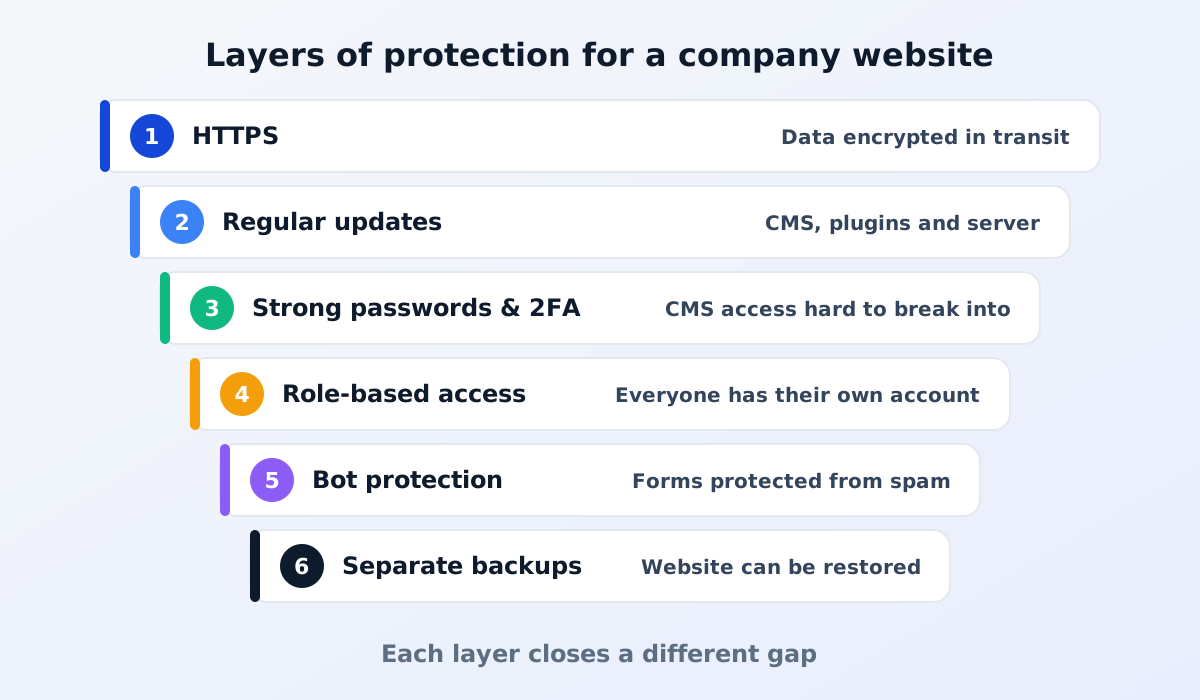
HTTPS encrypts the data sent between a visitor's browser and your website, such as the contents of a quote request form. Browsers mark websites without HTTPS as "not secure", which can make potential customers hesitate.
Make sure every page uses HTTPS, not just some of them, and that old addresses starting with "http://" redirect automatically to the "https://" version. SSL certificates also need renewing on time. Many hosting services now renew them automatically, but it is still worth checking.
A website is built from many components: the CMS, plugins, themes and the software on the server. Each component occasionally has a security flaw that is then fixed in an update. A website that is never updated piles up flaws that are already publicly known.
If your website uses a CMS with lots of add-on plugins, every plugin is one more component to maintain. Use only the plugins you really need, and remove the ones you don't use. Make sure someone is clearly responsible for applying updates.
Access to the CMS is the front door of your website. If an admin password leaks or is easy to guess, a hacker doesn't need to find a technical weakness at all.
Not everyone on the team needs full access. Marketing staff who write articles don't need to be able to delete pages or change website settings. With role-based access, a mistake or a leaked account doesn't affect the whole website.
Review the list of CMS users regularly. When employees change departments or leave the company, deactivate or adjust their access straight away. Forgotten old accounts are a weakness that often goes unnoticed.
Read also: what a CMS is and how it works.
Backups are the last safety net. If the website is damaged by an attack, an editing mistake or a server problem, a backup lets you return it to its previous state.
Good backups run automatically and regularly, are stored separately from the main website, and have been test-restored. A backup that has never been restored may not help when you need it.
Contact and quote request forms are often targeted by bots that send spam in large volumes. Besides being a nuisance, spam can bury important messages from potential customers.
Common protections include anti-bot checks on forms, limits on the number of submissions from the same source, and a web application firewall that filters suspicious traffic before it reaches the website. Choose protection that doesn't get in the way of genuine visitors.
Read also: choosing a web design company for more questions to ask before you start working together. To find out how well your website holds up against a real attack, ask about penetration testing too.
No. HTTPS protects data in transit, but it doesn't prevent hacking through weak passwords or out-of-date software. HTTPS is one of several layers of protection you need.
Yes. A company profile website still has CMS access, contact forms and the company's reputation at stake. A hacked website can be injected with harmful content and flagged as unsafe by browsers and search engines.
Contact your website provider or whoever manages your hosting straight away, change every user's password and restore the website from a clean backup. Then find out which weakness was exploited so the same thing doesn't happen again. The full steps are in website hacked: the first steps in 24 hours.
Website security isn't a one-off job but a habit: keep it updated, keep access limited and always have a backup.
Want a company website that is maintained and secured without the hassle? See our website services, or read what web hosting is and how to choose it.
Quotes for a company website can vary widely. Learn what drives the price and the running costs that are often forgotten before you choose a quotation.
Read the article →
Why your company should use email on its own domain, the service options, and a plain-English guide to SPF, DKIM and DMARC so your emails stay out of spam.
Read the article →