Connecting Your Website to Internal Systems: Forms, Stock and CRM

By · 18 November 2026 · 5 min read

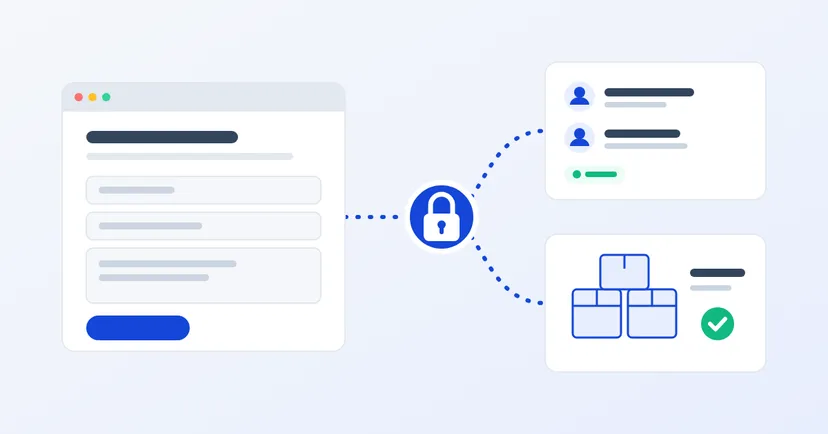
Illustration of a website connected to a CRM and a warehouse system through a padlock-protected link

Every morning, a sales admin opens the inbox, copies quote requests from the website into a spreadsheet or CRM, then forwards them to the right salesperson. On the product pages, "in stock" hasn't been updated for weeks. Customers ring to ask about things that are already in the warehouse system.

When the website and internal systems aren't connected, work gets retyped and information goes stale. Connecting them can help a lot, as long as it is done in the right order and without opening a new door for attackers. This article covers the three connections companies need most often: forms, stock and CRM.

Map the data flow first

Before talking technology, answer a few questions for each piece of data you want to connect:

  • What data moves? For example a name, company, the product asked about, or a stock quantity.
  • In which direction? From the website to an internal system (a form going into the CRM), or from an internal system to the website (stock shown on a product page).
  • Which system is the reference? If the figure on the website and in the warehouse system differ, it must be clear which one is right.
  • How often? On every change, every hour, or is once a day enough?
  • Who owns it? Who gets called if the data is wrong or the connection breaks?

A simple table is enough to record the answers. It makes discussions with your IT team or vendor easier, and stops connections being built just because they "can" be.

Website forms straight into the CRM

This is usually the connection that pays off fastest. As soon as a prospect submits a form, the data goes into the CRM as a new lead, with the page it came from and the product asked about. The responsible salesperson is notified, and no message gets lost in an inbox.

A few things to watch:

  • Form fields are still checked on the server. The OWASP input validation guidance warns that browser checks can be bypassed, so the server must check the same fields again before passing data on.
  • Filter spam before it reaches the CRM, so salespeople don't waste time on bot submissions.
  • Have a fallback when the CRM can't be reached. Store the submission and retry, or at least send it by email, so no lead is lost.
  • Prevent duplicates. The same customer may submit twice. Set a rule, for example matching by email address.

Read also: building a quote request form people actually fill in.

Stock and prices on the website

Showing warehouse stock on the website sounds simple, but there are business decisions behind it:

  • Numbers or status? Many B2B companies show only "available", "limited" or "made to order", without exact figures. Open stock numbers can be read by competitors.
  • Which stock counts? Goods already reserved for other customers, quarantined goods and stock in other warehouses may not count as available.
  • Prices for whom? If prices differ by distributor or volume, they are better shown only after a partner logs in to their own account.
  • How fresh is the data? For most B2B catalogues, periodic updates are enough. Show when the data was last updated so buyers aren't misled.

If your website serves distributors and resellers, read also website features distributors and resellers actually use.

How systems talk to each other

There are a few common methods, and you don't need the technical details. It's enough to know the options when talking to a vendor:

  • API: one system requests or sends data to another through an agreed channel. Suited to data that must move quickly, such as forms into the CRM.
  • Webhook: a system notifies another as soon as something happens, such as a stock change. The receiver must check that the message really comes from the legitimate sender. GitHub's documentation, for example, recommends verifying every webhook delivery with a signature based on a secret key before processing it.
  • Scheduled file export: the internal system produces a file every few hours and the website reads it. Simple, and enough for data that doesn't need to be very fresh.

Don't let the website become the way in

Anyone on the internet can reach your website, while the ERP and CRM hold very valuable data. The connection between them needs protecting:

  • Give the website only the access it needs. A website that only reads stock status doesn't need to change data or see customer records.
  • Use a dedicated account for the connection, not an employee's admin account.
  • Store access keys safely, not written into the website's files and not shared over chat.
  • Check permission for every record. The OWASP API Security Top 10 2023 puts object level authorisation first: every data request must be checked to confirm the requester is entitled to it, so partner A can't open partner B's order just by changing a number.
  • Limit the number of requests, because OWASP also notes that unrestricted resource consumption can take a service down or drive up costs.

Plan for when a connection fails

Connections will fail now and then: the internal server loses power, an access key expires, or the CRM vendor changes something. Make sure every data transfer is logged, a named person is notified when something fails, and there is a way to resend delayed data. The website should keep working even when an internal system can't be reached.

Start with one connection

  1. Pick the connection that saves the most manual work. For many companies, that is forms into the CRM.
  2. Write the data flow table and agree it with the data owners.
  3. Test with sample data, including when the target system is down.
  4. Monitor it for a few weeks, then move on to the next connection.

A good connection means data is typed once, and the website sees only what it really needs to see.

We build ERP and integration with your existing systems as custom development, following your company's processes. Want to discuss which connection is most useful to start with? Get in touch.