How Much Does a Company Website Cost? The Factors That Decide the Price
Quotes for a company website can vary widely. Learn what drives the price and the running costs that are often forgotten before you choose a quotation.
Read the article →
For a B2B company, the request for quote form is the point where a website visitor becomes a prospective customer. Everything that goes into a website, from product pages to articles, ultimately aims to get the right buyers to contact you.
However, a form that is too long puts buyers off filling it in, while a form that is too short means your sales team has to ask follow-up questions. This article covers how to design a well-balanced form and how to follow up on the requests that come in.
The form is only one part of the process. Just as important is what happens after the submit button is pressed: where the data is stored, who is notified and how the team follows up.
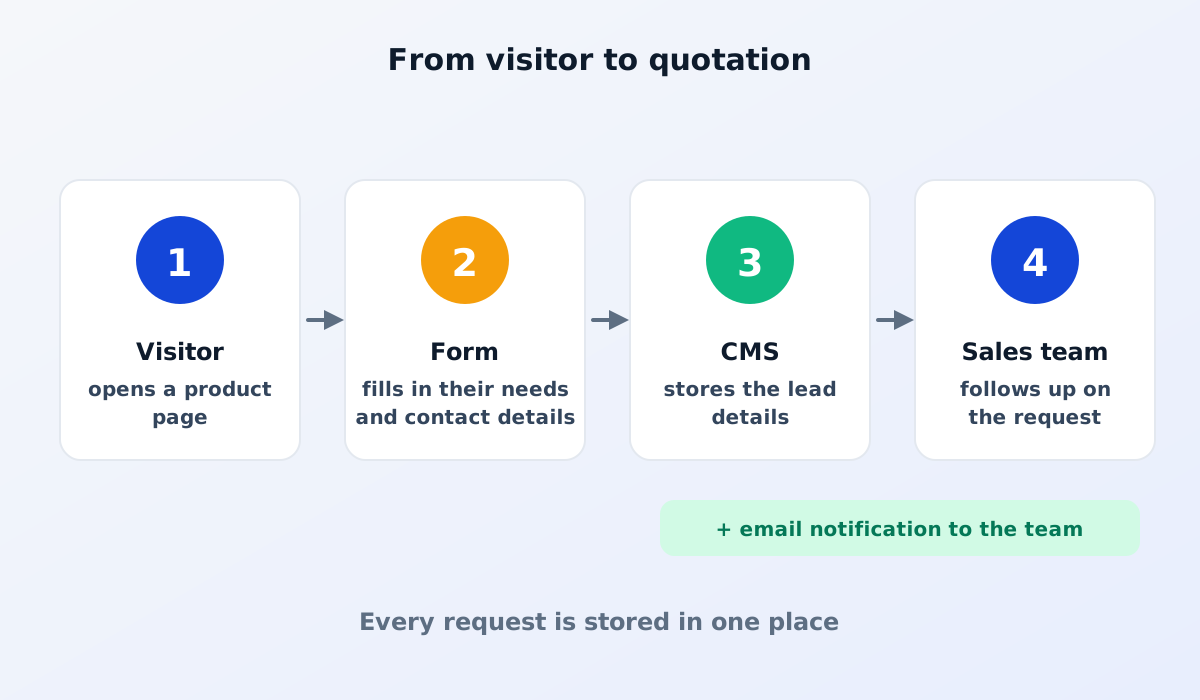
Ideally, every request is stored in the CMS as a lead, and the sales team receives a notification, for example by email. That way, no request gets lost in someone's personal inbox, and the history is kept even when staff change. If your team uses a CRM, these requests can also be sent straight to the CRM.
Ask only for the information you genuinely need to put together an initial quotation. For most B2B companies, these fields are enough:
If the form sits on a product page, the product field can be filled in automatically for that page. Small touches like this reduce the effort for buyers. If you serve buyers from outside Indonesia, also offer the form in their language, because buyers are more comfortable explaining their needs in a language they know well.
Every extra field is another reason for a buyer to put it off. Information such as the delivery address, the tax number (NPWP, Indonesia's taxpayer identification number) or the delivery schedule can usually be asked for after an initial conversation.
A few principles that help:
In Indonesia, many buyers prefer to get in touch via WhatsApp. A WhatsApp button makes quick conversations easy, but requests that arrive by chat are often scattered across staff phones and hard to track.
A form produces more structured data that is stored neatly. The approach that often works best is to offer both: a form for fuller quote requests and a WhatsApp button for quick questions. Where possible, use a company WhatsApp number rather than a staff member's personal number. See also how to add a WhatsApp button without getting in visitors' way.
Read also: website or social media for a B2B business.
Even the best form is useless if the requests that come in are not answered promptly. B2B buyers often ask several suppliers for quotes at the same time, so how quickly and clearly you respond makes a difference.
A form that is open on the internet will almost certainly receive spam from automated programs. Common protections include a hidden field that only automated programs fill in (a honeypot), a limit on the number of submissions from the same source and verification services that tell humans apart from bots. Choose methods that don't make life difficult for genuine visitors, because complicated puzzles can also make buyers give up.
Add a short sentence near the submit button explaining that the data will only be used to respond to the request. If you have a privacy policy page, link to it. This shows that your company respects buyers' data, and it is in line with the applicable personal data protection rules (in Indonesia, the Personal Data Protection Law, UU PDP).
Put it on the contact page and add a request for quote button to every product page. Buyers reading about a particular product shouldn't have to hunt for a way to contact you.
For many B2B businesses in Indonesia, a WhatsApp number makes follow-up easier. Even so, it is best to make either the email address or the phone number required, not both, so the form stays light.
A good form makes it easy for buyers to ask, and a good follow-up process makes sure that question becomes a conversation.
See also the essential pages for a factory website, or contact us to discuss your company website.
Quotes for a company website can vary widely. Learn what drives the price and the running costs that are often forgotten before you choose a quotation.
Read the article →
The basic steps for keeping a company website secure: HTTPS, regular updates, strong passwords and 2FA, user access rights, backups and protection from spam.
Read the article →