How Much Does a Company Website Cost? The Factors That Decide the Price
Quotes for a company website can vary widely. Learn what drives the price and the running costs that are often forgotten before you choose a quotation.
Read the article →
For factories and manufacturers, the website is where prospective buyers decide whether you are the right supplier. They want to know what you make, how much capacity you have, whether your quality is assured and how to ask for a quotation.
A well-structured website answers all of these questions before a buyer contacts you. Here are the pages a factory website should have.
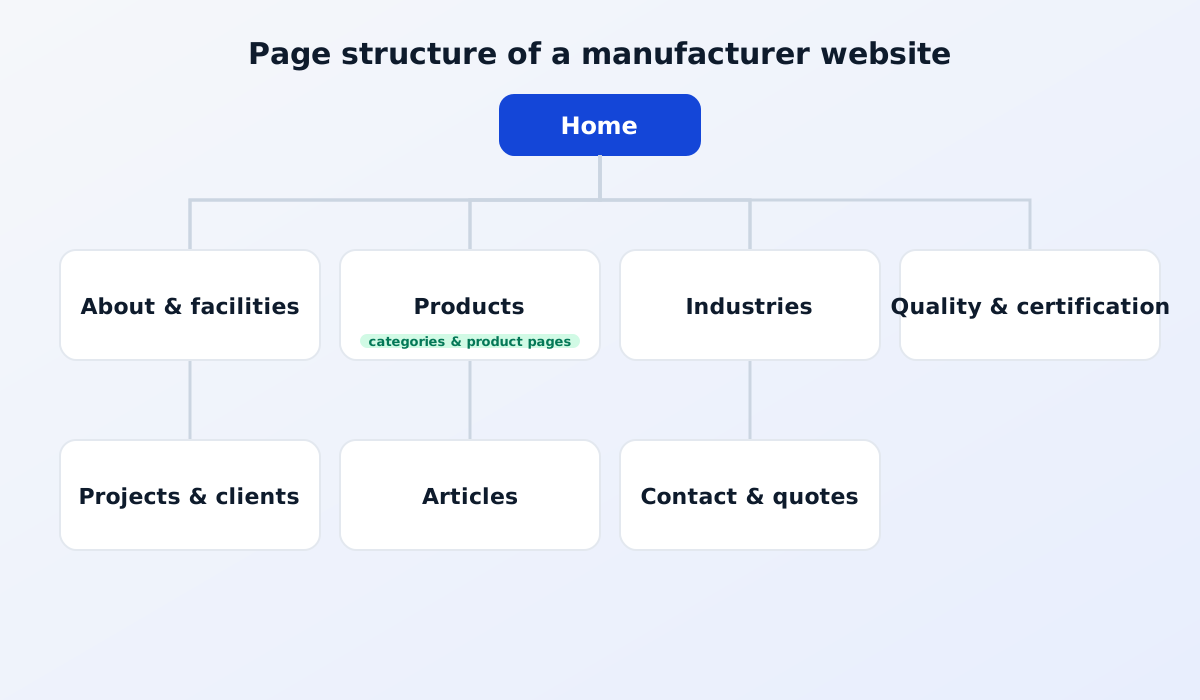
The home page is the first impression. Within a few seconds, visitors should understand what you make and who it is for. Show real photos of your products or facilities, a summary of your strengths and clear buttons to view products or request a quote.
B2B buyers want to be sure you can fulfil their orders. Explain:
Genuine photos of your facilities are far more convincing than stock images. See also an About Us page that builds trust with B2B buyers.
This is the most important page. Organise your products into categories that buyers understand easily, and give each product its own page with photos, a description, specifications and the available materials or sizes.
Every product page is also a chance to appear in Google search. Buyers searching for a specific product can land directly on your product page.
Read also: product catalogue website service.
Many buyers look for suppliers by their own industry, for example food, cosmetics, pharmaceuticals or automotive. Industry pages show that you understand their specific needs and point them to the relevant products.
For corporate buyers, quality assurance is often a key requirement. Show the certifications you hold, your quality control process and the standards you follow. If you hold specific certifications, for example for food safety or quality management, display them clearly.
Real evidence of your work is one of the strongest trust factors. Show projects you have completed or client logos, with their permission of course. Where possible, briefly describe what the client needed and the solution you provided. If clients don't want to be named, read writing case studies without revealing client secrets.
Articles help your website be found for a wider range of searches and show your expertise. Topics might include guides to choosing materials, comparisons of product types or trends in your customers' industries.
This page turns visitors into prospective customers. Provide a quote request form that asks for the key information, such as product type, quantity and specifications, so your sales team can follow up quickly. Also list your factory address, a location map and other ways to get in touch.
For international buyers, read multilingual websites for manufacturing and export companies.
You don't have to build every page at once. Start with the home page, the company profile, your main products and the contact page. Other pages, such as articles and projects, can be added gradually through the CMS. Most importantly, the website should answer buyers' questions and make it easy for them to contact you.
A good product page helps buyers decide without having to ask. A few tips:
A complete product page is also easier to find on Google, because it contains the words buyers actually search for.
Show every product you want to sell, but start with the most important ones. The catalogue can be completed gradually through the CMS after the website launches.
In B2B, prices often depend on order quantity and specifications, so many factories choose not to show prices and invite buyers to request a quote instead. If your products have standard prices, showing them can speed up the buyer's decision.
A good factory website works like a sales team that never sleeps: it explains your products, builds trust and accepts quote requests at any time.
See also our comparison of company profile and product catalogue websites.
Quotes for a company website can vary widely. Learn what drives the price and the running costs that are often forgotten before you choose a quotation.
Read the article →
The basic steps for keeping a company website secure: HTTPS, regular updates, strong passwords and 2FA, user access rights, backups and protection from spam.
Read the article →