Privacy and Cookie Policies on Your Website: What They Must Include
What a privacy policy for website owners in Indonesia must include under UU PDP: the required information, cookies, an honest consent banner, common mistakes.
Read the article →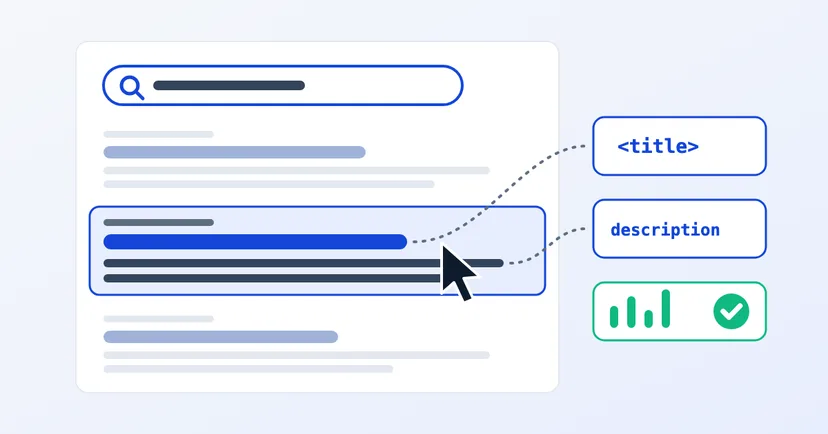
Your product page already shows up on Google. People see it, but few click. Search Console makes it plain: hundreds of impressions, only a handful of clicks. Often the problem isn't the ranking but the two lines of text people read before deciding: the title and the description.
This article covers how to write clear page titles and meta descriptions, why Google sometimes replaces them, and how to check whether your changes worked.
Every Google result has two main parts. The first is the title, the blue text people click. Google calls it the title link, and says it helps people decide which result to click. Its main source is the title tag in the page code, which also appears in browser tabs and bookmarks.
The second is the snippet, one or two lines of text below the title. Google mainly takes it from the page content, choosing the part that best matches the search. Sometimes Google uses the meta description instead, a summary of the page you write yourself in the page code, when it gives a more accurate picture of the page.
On most websites you can edit both in the CMS. If you can't find the fields, ask your web developer.
Google's guidance on titles is fairly simple. Every page needs a title. It should describe the page content, be concise and differ from the titles of other pages.
As for length, Google sets no official limit. But long titles are cut off to fit the screen width, so put the most important words first.
Many website owners are surprised that the title on Google differs from the one they wrote. This is normal. Google builds title links automatically from several sources: the title tag, the main visible title on the page, headings such as h1, prominent text and the text of links pointing to the page.
Google is more likely to rewrite a title when it finds a problem, for example:
The safest approach: keep the title tag in line with the main title visible on the page. When the two agree, Google has fewer reasons to replace it.
According to Google, a good meta description is short, unique to one page and includes the most relevant points of that page. One or two sentences is usually enough.
As with titles, Google doesn't limit the length of a meta description, but snippets are cut to fit the screen width. Remember too that Google may show a passage from the page that better matches a particular search. That makes the opening paragraph of your page just as important.
Imagine the services page of a packaging manufacturer.
The second version answers three questions at once: what is on offer, who it is for and what to do next. Make sure everything in the description is actually on the page. If the page doesn't mention four-colour printing, don't put it in the description.
Product pages have needs of their own. Read also: product pages that Google finds and buyers trust.
The Performance report in Google Search Console shows clicks, impressions and CTR, which is clicks divided by impressions. Open the Pages tab to see the figures for each page.
For more on reading these figures, see how to measure your website's results.
The title and description are your page's shop window on Google. Write them for the person searching, not for the machine.
Want the full picture? Start with how to get your website on Google. If you'd like help reviewing the titles and descriptions on your website, get in touch.
What a privacy policy for website owners in Indonesia must include under UU PDP: the required information, cookies, an honest consent banner, common mistakes.
Read the article →
PSE registration in Indonesia under GR 71/2019 and MR 5/2020: who must register, how to assess your company website, registering via OSS, and the sanctions.
Read the article →