How Much Does a Company Website Cost? The Factors That Decide the Price
Quotes for a company website can vary widely. Learn what drives the price and the running costs that are often forgotten before you choose a quotation.
Read the article →
When someone searches for your company name on Google, the first thing they often see is a panel with your address, opening hours, photos and reviews. That panel comes from Google Business Profile, formerly known as Google My Business. The same profile also decides how your company appears on Google Maps.
Many B2B companies and manufacturers ignore this profile because they feel their buyers don't come from local search. Yet corporate buyers, job applicants, couriers and suppliers all look up your location and company details on Google. A complete, accurate profile helps them find you and builds trust.
Google Business Profile, Google Maps and your website are not three separate things. The information in your profile appears in search results and on Maps, while the link in your profile sends visitors to your website for the full picture.
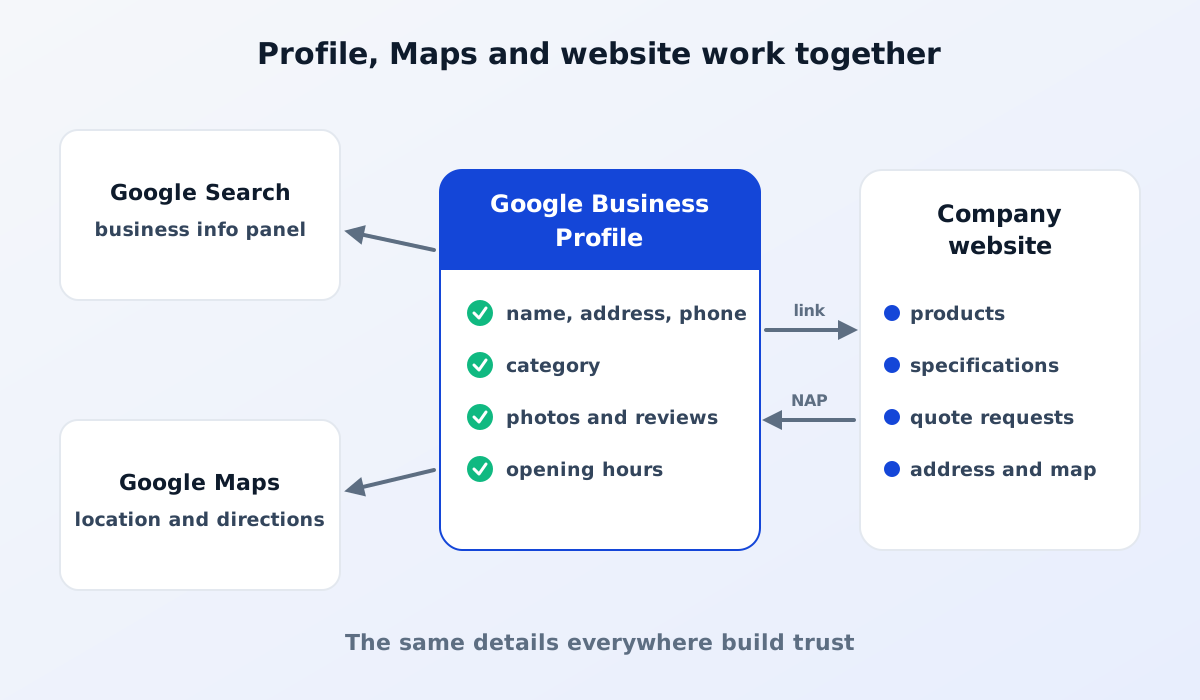
Your website provides product details, capacity and how to request a quote. Your business profile provides proof that your company is real and has a clear location. The two complement each other.
The profile is created through a Google account, ideally one managed by the company rather than a staff member's personal account. If your company location already shows up on Maps, the profile probably exists and you only need to claim it.
Google will then ask you to verify that you really manage the business. The verification methods offered can vary, for example by phone, email, a video showing your location and business activity, or a letter to the business address. Follow the options shown in your account. Until the profile is verified, your changes may not be displayed.
An important tip: add more than one manager from within the company, so access isn't lost when staff change.
The primary category helps Google understand your business and decide which searches it is relevant for. Choose the most specific category that matches your main activity, for example a manufacturer of a particular type of product, rather than a generic category. Add secondary categories where they are genuinely relevant, but don't pick categories that don't describe your business just to appear in more searches.
Consistency of company name, address and phone number is often abbreviated to NAP (name, address, phone). Make sure all three are written the same way on your business profile, website, social media and other directories.
For factories with large sites, an accurate pin really helps visitors and couriers avoid ending up at the wrong gate. For block and plot addresses in industrial estates, read local SEO for factories in industrial estates.
Photos make the profile look real and well looked after. Upload genuine photos, not stock images:
Update your photos regularly, for example when you add new facilities or products.
Reviews shape a prospective buyer's first impression. Ask satisfied customers to leave an honest review, for example after a project is completed. Don't buy reviews or offer rewards for positive ones: it breaches Google's policies and can damage trust.
Respond to reviews politely, both positive and negative. For a negative review, acknowledge the problem, offer a solution and invite the reviewer to continue the conversation through official channels. A professional response is often noticed more by readers than the review itself.
Add your website address to your profile. If you serve buyers from many sectors, point to the most relevant page, such as the home page or your main products page. On your website, show the same address and location map as on your profile, so Google and visitors get consistent information.
Read also: how to get your company website on Google.
The profile is no substitute for a website, but it helps a great deal. Buyers who already know your name often search for it on Google to confirm your company is real, see where it is or find a phone number. A complete profile gives them a quick, reassuring answer.
Each location that genuinely receives visitors can have its own profile, for example a sales office and a factory. Make sure each location's name, address and opening hours are clear so visitors go to the right place.
No. A profile only holds basic information. To explain your products, specifications and certifications, and to receive quote requests, you still need a website.
Google Business Profile helps buyers find you; your website helps them decide to work with you.
See also our company profile website service, or read website or social media for B2B.
Quotes for a company website can vary widely. Learn what drives the price and the running costs that are often forgotten before you choose a quotation.
Read the article →
The basic steps for keeping a company website secure: HTTPS, regular updates, strong passwords and 2FA, user access rights, backups and protection from spam.
Read the article →