How Much Does a Company Website Cost? The Factors That Decide the Price
Quotes for a company website can vary widely. Learn what drives the price and the running costs that are often forgotten before you choose a quotation.
Read the article →
Once a company website has launched, the next question is almost always the same: is this website actually delivering? Without data, the answer is only a guess. With the right data, you can see where potential customers come from, which pages they read and how many end up contacting the company.
Two free tools from Google are enough to get started: Google Analytics 4 and Google Search Console. This article explains what each one does, which figures to watch and how to review them regularly without drowning in data.
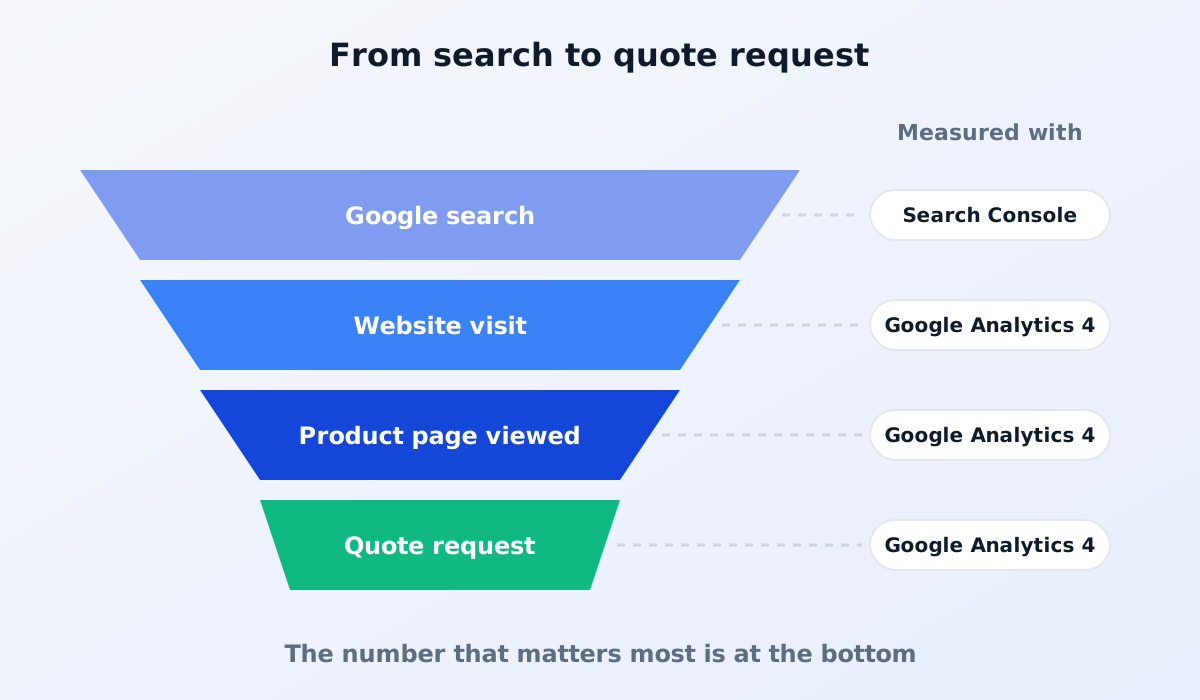
Google Search Console shows how your website appears in Google search results, before anyone clicks. Here you can see the keywords your website appears for, how many times it appears (impressions), how many times it is clicked and any technical problems Google has found.
Google Analytics 4 shows what happens after people arrive on your website: how many visitors there are, where they come from, which pages they open and whether they take important actions such as submitting a form.
The two complement each other. Search Console answers "how do people find us", while Analytics answers "what do they do next".
The number of visitors shows how many people come to your website. It is useful for spotting trends from month to month, but it isn't the only measure of success. For a B2B business, a few of the right visitors are worth more than lots of irrelevant ones.
Analytics groups visitors by where they came from, for example Google search, direct visits (typing in the website address), social media or links from other websites. This tells you which channels are working and which need strengthening.
See which pages get the most visits. If a particular product page is busy, make sure its information is complete and that it invites people to contact your team. If an important page is quiet, it may be hard to find from the menu or not yet showing up on Google.
Analytics also shows whether visitors use phones or computers, and which cities or countries they come from. If most visitors are on phones, make sure your product pages and forms are comfortable to use on a small screen. If many visitors come from abroad, it may be time to consider another language version.
The performance report in Search Console shows the keywords your website appears for. Look out for keywords that appear often but are rarely clicked: the page title or description may not be compelling enough. Relevant keywords that don't yet have a dedicated page can also become ideas for new articles.
For a B2B company website, the main measure of success isn't the number of visitors but how many potential customers contact the company. That could be a quote request form, a click on the WhatsApp button, a click on the phone number or an email.
To measure them, these actions need to be recorded as important actions (in Google Analytics 4 they are called key events, previously known as conversions). Ask your website provider to set them up from the start. Without this, Analytics only shows visitor numbers, with no idea who actually became a lead. Clicks on a WhatsApp button can be recorded the same way.
Complement this data with your own internal records. When a quote request comes in, ask how they found your company. Website data and what customers tell you directly complement each other.
You don't need to open Analytics every day. A monthly review is enough for most company websites. Use this list:
Compare with the previous month and the same period last year, especially if your business has particular busy seasons.
Both are free. What you need is a correct setup and access owned by the company itself.
Data starts building up from the moment the tools are installed. To see meaningful trends, you usually need a few months of data, especially for a new website that is still building its position on Google.
Ideally, yes. Mention your use of analytics tools on your website's privacy policy page, in line with the applicable data protection rules. Read what a privacy and cookie policy must include.
A good website isn't just looked at but measured: how many people come, and how many end up contacting you.
Want a website that is ready to measure from day one? See our website services, or read how to get your company website on Google.
Quotes for a company website can vary widely. Learn what drives the price and the running costs that are often forgotten before you choose a quotation.
Read the article →
When a company website needs a redesign, and how to move to a new site without losing Google rankings: content inventory, 301 redirects and Search Console.
Read the article →