How Much Does a Company Website Cost? The Factors That Decide the Price
Quotes for a company website can vary widely. Learn what drives the price and the running costs that are often forgotten before you choose a quotation.
Read the article →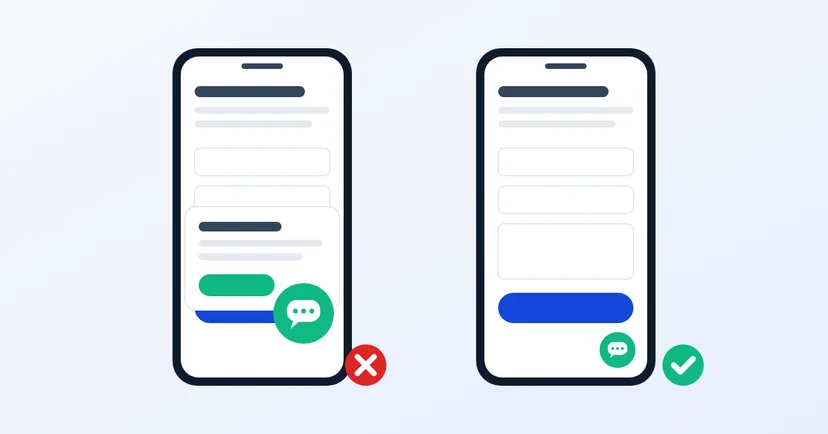
Many buyers in Indonesia would rather chat than fill in a form. It makes sense that you want a WhatsApp button on your website. The trouble is that a carelessly added button often gets in the way: it covers other buttons on mobile, opens the wrong number, or makes the website feel slow.
This article covers how to add a WhatsApp button that helps buyers reach you, without spoiling their experience of reading your website.
Chat suits quick questions: stock, sizes, delivery costs, or simply checking that you are still in business. But not every B2B buyer wants to chat. Procurement teams at larger companies often need a channel that leaves a record, such as email or a quote request form that can be forwarded to a manager.
So offer both. The WhatsApp button for those who want speed, the form and email for those who need a formal channel. Buyers choose for themselves.
A WhatsApp button on a website is essentially a "click to chat" link. According to the WhatsApp Help Center, the format is https://wa.me/ followed by the full phone number in international format, without leading zeros, brackets or dashes.
For an Indonesian number, that means the leading 0 is replaced by the country code 62. The number 0812-xxxx-xxxx becomes https://wa.me/62812xxxxxxxx. Don't use a plus sign.
WhatsApp also supports a pre-filled message through the ?text= parameter. Use it so your team knows the context straight away. For example, the button on a particular product page can pre-fill "Hello, I'd like to ask about [product name]". The buyer can still edit the message before sending it.
A few more points:
A floating button in the bottom right corner is common and easy to recognise. But on a phone screen it often covers something important: a form's "send" button, a bottom menu or the cookie banner.
There are two ways to add a WhatsApp button. The first is a plain link with an icon: light, and it loads nothing from anyone else. The second is a third-party chat widget that shows a window, an agent photo and animations.
Third-party widgets load extra scripts. Google's web.dev guidance notes that third-party scripts can slow down your site. To simply open WhatsApp, a plain link is enough. If you do need a widget, measure your website's speed before and after adding it. Also check whether the widget adds a second icon that stacks on top of other buttons on a phone screen.
A good button is pointless if nobody answers the chat. Before you add the button, make sure that:
Don't promise "reply within 5 minutes" if your team may not manage it. Honest working hours are more credible than a promise that is often missed.
If your website uses Google Analytics 4 with enhanced measurement turned on, clicks on links that lead away from your domain are recorded as a click event. Because the WhatsApp link goes to wa.me, clicks on this button are recorded too. From there you can see which pages generate the most chats.
Another simple method: vary the pre-filled message per page. Your sales team immediately knows whether the chat came from a product page, the contact page or an article.
A good WhatsApp button is barely noticeable until a buyer needs it. Once clicked, the chat goes straight to the right person with clear context.
If your website feels heavy after adding various widgets, read why company websites are slow. To weigh up the role of chat and social media, see website or social media for a B2B business. Want a website with tidy contact buttons on every device? See our website services.
Quotes for a company website can vary widely. Learn what drives the price and the running costs that are often forgotten before you choose a quotation.
Read the article →
How to write a case study for your website when the client won't be named: check contracts and personal data, decide how much to share, and get sign-off.
Read the article →